
Welcome
Dear visitor!
Welcome to the new web portal with interesting tools round the Microsoft Windows operating systems. Do you have to complete time-consuming tasks repeatedly, consisting of many small steps and wouldn´t you be glad if a small application helps you to arrange this with just one click?
Then you´re just right here! This homepage aims at providing a lot of users valuable small helpers, capable of bundling tasks und thus saving a lot of time. These applications are intentionally as simple as possible designed and need no installation on your system. Just choose the tool that´s right for you, download and start it... That´s all!
As this page has been online just for a short time, there are not many available programs yet here. But shortly you will find a lot of new beneficial helper applications that will make your life easier! Just visit this page again!
Do you have suggestions on your own? Then don´t hesitate to contact us via E-Mail at info@windows-tools.info and tell us your requirements. Maybe even your problem can be solved!
Help me so that I can help you!
The development of applications is for free. The maintenance of this page and material required for special purpose applications is not.
So if you find one of these programs useful and work with them, it would give me great pleasure if you gave me a small donation via PayPal for my work. Thank you very much!
File Logger
Download (save first, then run):
Version 1.0.0 (08.04.2008)

A useful application if you intend to bring together all files and directories of a volume with all available information.
First choose a volume or a directory. Then decide what kind of information you need and in the twinkling of an eye the program saves all file and directory names with all chosen information to an so-called CSV file. This file can be viewed and modified by nearly all office programs.
At the beginning, the application searches for updates online, so don´t be concerned when your firewall might alarm you.
Do you have any suggestions on how to improve or extend this application?
Simply send an E-Mail to info@windows-tools.info...
System requirements: Windows 2000/XP/2003/Vista/2008 with .NET Framework 2
Font Snatcher
Download (save first, then run):
Version 1.0.0 (16.04.2008)
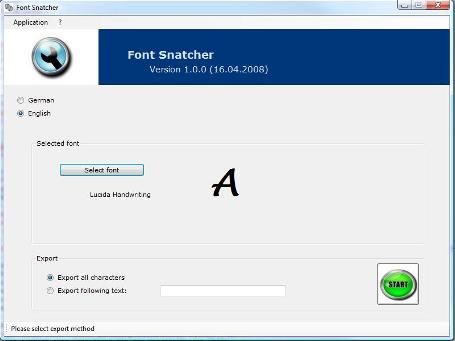
A thief in the truest sense of the word...
Fonts on PCs are available in a format that is optimized for scalability, as you want to use different font sizes of course. Word processors help us to select between different fonts and suit them to our requirements.
But what when you need this text in a graphical format?
Then this small application will help you achieve this aim...
Simply choose your font with your needed size, make it bold or italic, crossed-out or underlined and the font snatcher will do the work for you. It saves depending on your selection either all available characters (even special ones) as a bitmap or a complete sentence in different formats, e.g. BMP, GIF, PNG or JPEG and some others.
Do you have any suggestions on how to improve or extend this application?
Simply send an E-Mail to info@windows-tools.info...
System requirements: Windows 2000/XP/2003/Vista/2008 with .NET Framework 2